Storage Buckets
Railway Buckets are private, S3-compatible object storage buckets for your projects. They give you durable object storage on Railway without needing to wire up an external provider. Use them for file uploads, user-generated content, static assets, backups, or any data that needs reliable object storage.
Getting started
To create a bucket in your project, click the Create button on your canvas, select Bucket, and select its region and optionally change its name. You aren't able to change your region after you create your bucket.
Unlike traditional S3, you can choose a custom display name for your bucket. The actual S3 bucket name is that display name plus a short hash, ensuring it stays unique across workspaces.
Connecting to your bucket
Railway Buckets are private, meaning you can only edit and upload your files by authenticating with the bucket's credentials. To make files accessible publicly, you can use presigned URLs, or proxy files through a backend service. Read more in Serving and Uploading Files.
Public buckets are currently not supported.
If public buckets is something you're interested in, leave your feedback in Central Station and tell us your use-case. We're excited to hear what you'd like to build!
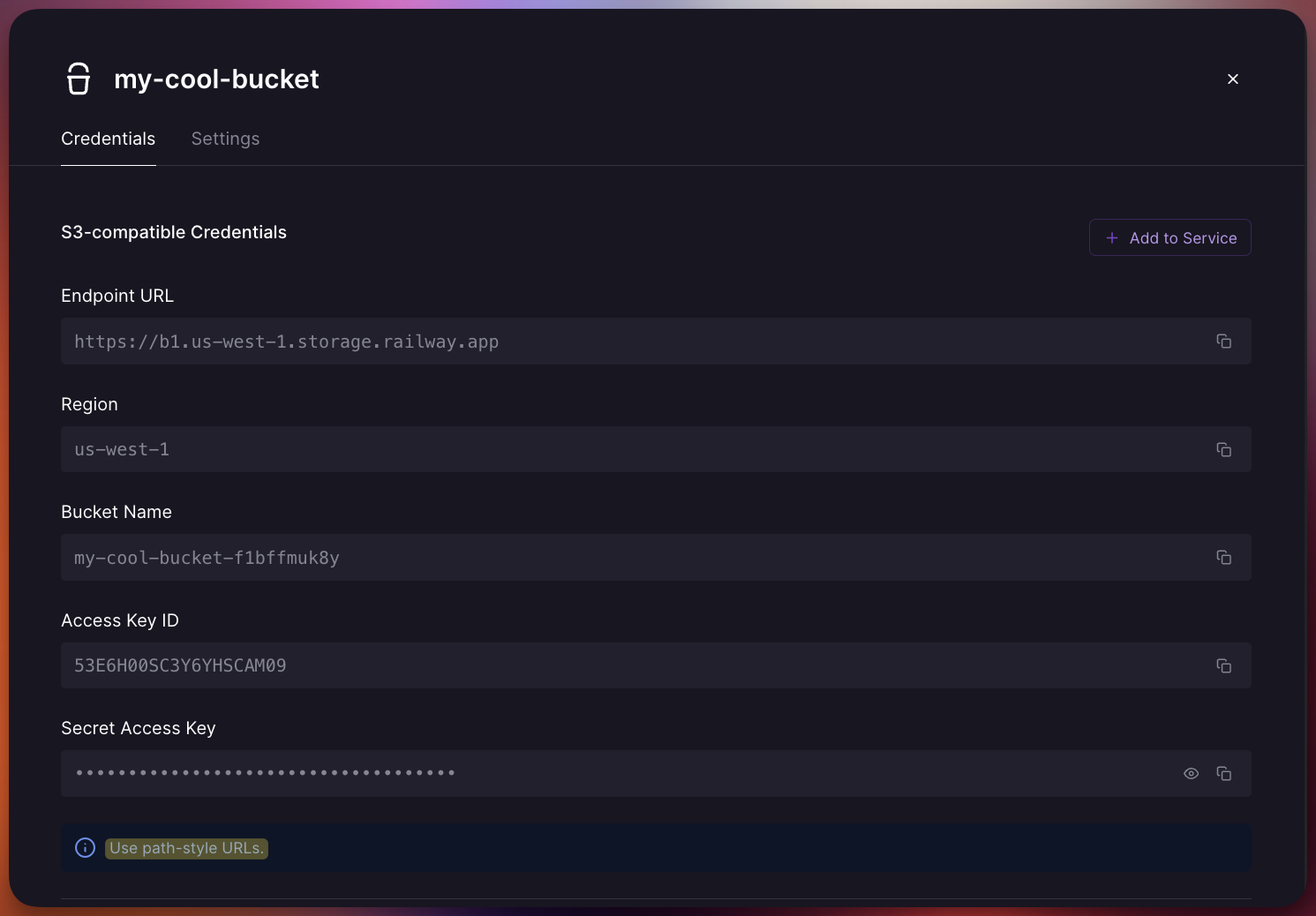
Once your bucket is deployed, you'll find S3-compatible authentication credentials in the Credentials tab of the bucket. These include the necessary details for you to connect to your bucket using your S3 client library.
URL style
Railway Buckets use virtual-hosted–style URLs, where the bucket name appears as the subdomain of the S3 endpoint. This is the standard S3 URL format, and most libraries support it out of the box. In most cases you only need to provide the base endpoint (https://storage.railway.app) and the client builds the full virtual-hosted URL automatically.
Buckets that were created before this change might require you to use path-style URLs instead. The Credentials tab of your bucket will tell you which style you should use.
Variable references
Storage Buckets can provide the S3 authentication credentials to your other services by using Variable References. You can do this in two ways:
Railway-provided variables
Railway provides the following variables which can be used as Variable References.
| Name | Description |
|---|---|
BUCKET | The globally unique bucket name for the S3 API. Example: my-bucket-jdhhd8oe18xi |
SECRET_ACCESS_KEY | The secret key for the S3 API. |
ACCESS_KEY_ID | The key id for the S3 API. |
REGION | The region for the S3 API. Example: auto |
ENDPOINT | The S3 API endpoint. Example: https://storage.railway.app |
RAILWAY_PROJECT_NAME | The project name the bucket belongs to. |
RAILWAY_PROJECT_ID | The project id the bucket belongs to. |
RAILWAY_ENVIRONMENT_NAME | The environment name of the bucket instance. |
RAILWAY_ENVIRONMENT_ID | The environment id of the bucket instance. |
RAILWAY_BUCKET_NAME | The bucket name.This is not the bucket name to use for the S3 API. Use BUCKET instead. |
RAILWAY_BUCKET_ID | The bucket id. |
Serving and uploading files
Buckets are private, but you can still work with their files in a few ways. You can serve files straight from the bucket using presigned URLs, proxy them through your backend, or upload files directly from clients or services.
Bucket egress is free. Service egress is not. If your service sends data to users or uploads files to a bucket, that traffic counts as service egress.
Learn about the different patterns for working with files in the Uploading & Serving Files guide.
Buckets in environments
Each environment gets its own separate bucket instance with isolated credentials. When you duplicate an environment or use PR environments, you won't need to worry about accidentally deleting production objects, exposing sensitive data in pull requests, or polluting your production environment with test data.
How buckets are billed
Buckets are billed at $0.015 per GB-month. All S3 API operations and bucket egress are unlimited and free.
For detailed pricing information, plan limits, and billing examples, see the Storage Buckets Billing page.
Cost comparison
Railway Buckets offer competitive pricing compared to other S3-compatible storage providers:
| Railway Buckets | AWS S3 Standard | Cloudflare R2 | |
|---|---|---|---|
| Storage | $0.015 / GB-month | $0.023 / GB-month | $0.015 / GB-month |
| Egress | Free | $0.09 / GB | Free |
| API Operations | Free (unlimited) | $0.005 / 1K writes, $0.0004 / 1K reads | $4.50 / 1M Class A, $0.36 / 1M Class B |
Railway matches R2's storage pricing while offering free unlimited API operations. Compared to S3, Railway is more cost-effective on storage, egress, and operations.
S3 compatibility
Buckets are fully S3-compatible. You can use them with any S3 client library for any language, tool, or framework, and you can expect the same functionality on Railway Buckets as if you were using a normal S3 bucket.
Supported features include:
- Put, Get, Head, Delete objects
- List objects, List objects V2
- Copy objects
- Presigned URLs
- Object tagging
- Multipart uploads
Not yet supported:
- Server-side encryption
- Object versioning
- Object locks
- Bucket lifecycle configuration
Deleting a bucket
You can delete your bucket by clicking on it in your canvas, going to Settings, and selecting Delete Bucket. The bucket will disappear immediately from your project, but it's not permanently deleted yet. It will only be permanently deleted after two days to protect against accidental deletions.
You will continue to be billed for your accumulated storage size until your bucket has been permanently deleted at the two-day mark. To prevent being billed for the storage, remove all files from the bucket before deleting it.
FAQ
Help us improve storage buckets
Upvote these feature requests on the feedback page if these features sound useful to you:
If you have an idea for other features, let us know on this feedback page.